
Currently trending on Sitex Direct
Popular products with our buyers
Soon stocks will run out
Dont miss this opportunity while supplies last.
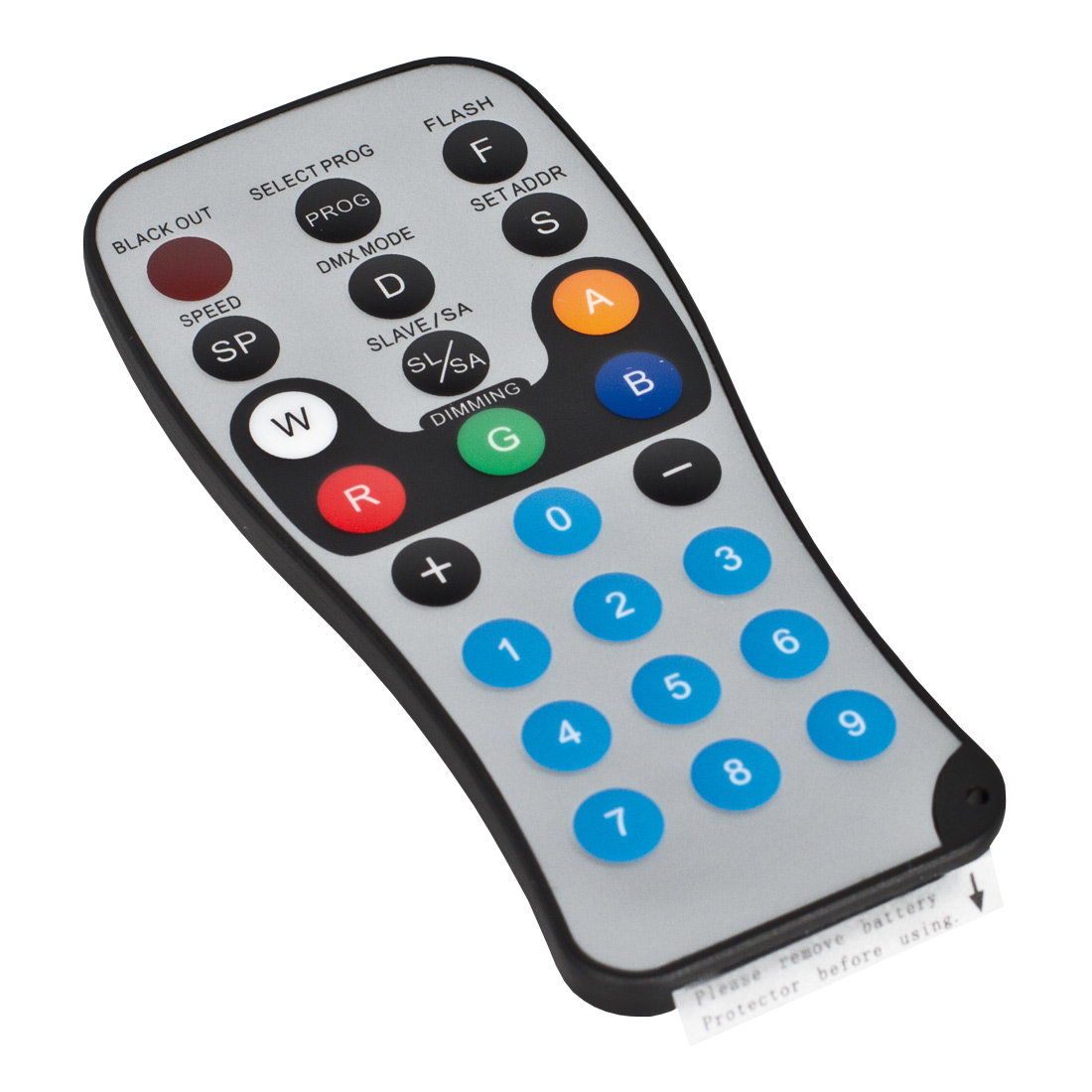
LED RC2
Remote Control for:. Flat PAR CWWW9. Flat PAR CWWW18. Flat PAR QA5. Flat PAR QA5X. Flat PAR QA5XS. Flat PAR QA12. Flat PAR QA12X. Flat PAR QA12XS. Flat PAR QWH5. Flat PAR QWH5X. Flat PAR QWH5XS.
13 in stock






Payment Pay securely online using all major debit and credit cards, Apple Pay and Google Pay. Approved trade account customers can also purchase on their agreed credit terms.
Fast & Reliable UK Delivery We deliver across the UK with trusted courier partners. Enjoy free UK delivery on eligible orders over £100, with delivery options and estimated arrival times shown at checkout.
Buy with Confidence Our UK-based team is here to help before and after your purchase. Easy returns are available in line with our Returns Policy.

Description
Remote Control for :
Flat PAR CWWW9
Flat PAR CWWW18
Flat PAR QA5
Flat PAR QA5X
Flat PAR QA5XS
Flat PAR QA12
Flat PAR QA12X
Flat PAR QA12XS
Flat PAR QWH5
Flat PAR QWH5X
Flat PAR QWH5XS
Flat PAR QWH12
Flat PAR QWH12X
Flat PAR QWH12XS
Mega QA PAR 38
Mega TriPar Profile Plus
Mega Par Profile Plus
Mega 64 Profile Plus
VBAR PAK
VPAR PAK
Pinpoint Go Colour
RGB 3C IR
RGBW4C IR
Blackout - Pressing this button will blackout the fixture.
PROGRAM SELECTION - This button has multiple functions depending on the fixture used. It can activate Auto Run or activate/shut off the LCD Display of the fixture scroll through the preset colours and programs.
FLASH - This button will activate the strobe effect. You can control the flash rate by pressing the
“+” and “-” buttons. Press this button again to exit strobe mode.
SPEED - Press this button and use the “+” & “-” buttons to adjust the speed of the Auto run.
DMX MODE - This button will let you select which DMX mode you want to use. Some fixtures will
come with different DMX channel modes. This button will switch between the different
modes. Please see your corresponding fixture in this user manual to find out
about your DMX modes values and traits.
SOUND ACTIVE - This button activates sound active mode. Sound active mode will not work for
outdoor LED lights.
SLAVE - This designates the fixture as a Secondary fixture in a Primary/Secondary configuration.
SET ADDRESS - Press this button to set the DMX address. Press this button first then press the
numbers to set the address. Example: DMX Address 1 Press “S001”
DMX Address 245 Press “S245”
R G B A W- Press either one of these buttons and then press the “+” and “-” to adjust the brightness.
“+” and “-” - Use these buttons to adjust the flash rate speed of the Auto Run dimming and program
selection.
Reviews
There are no reviews yet.